Making Port / Maritime Safety Simple: Designing Digital HSE Tools for Port / Maritime Frontline Teams
What makes a digital HSE tool simple for frontline teams?
A frontline-friendly digital HSE tool lets workers complete a specific safety task using clear language, relevant questions and visible status updates. In Port / Maritime operations, it should accommodate actual working conditions, explain offline limitations and connect reports to accountable follow-up. Simplicity must preserve required checks and authorised decisions.
The aim is to reduce unnecessary effort while keeping the information needed to act.
Start with the task, not the menu
A software platform may contain incidents, inspections, permits, audits, training and environmental records. A worker rarely begins a shift thinking about those module names.
They are more likely to ask:
- How do I report something that needs attention?
- Which inspection am I expected to complete?
- Where can I find the current permit information?
- Has anyone responded to the concern I raised?
- What remains outstanding before the next shift takes over?
Design the frontline experience around those questions.
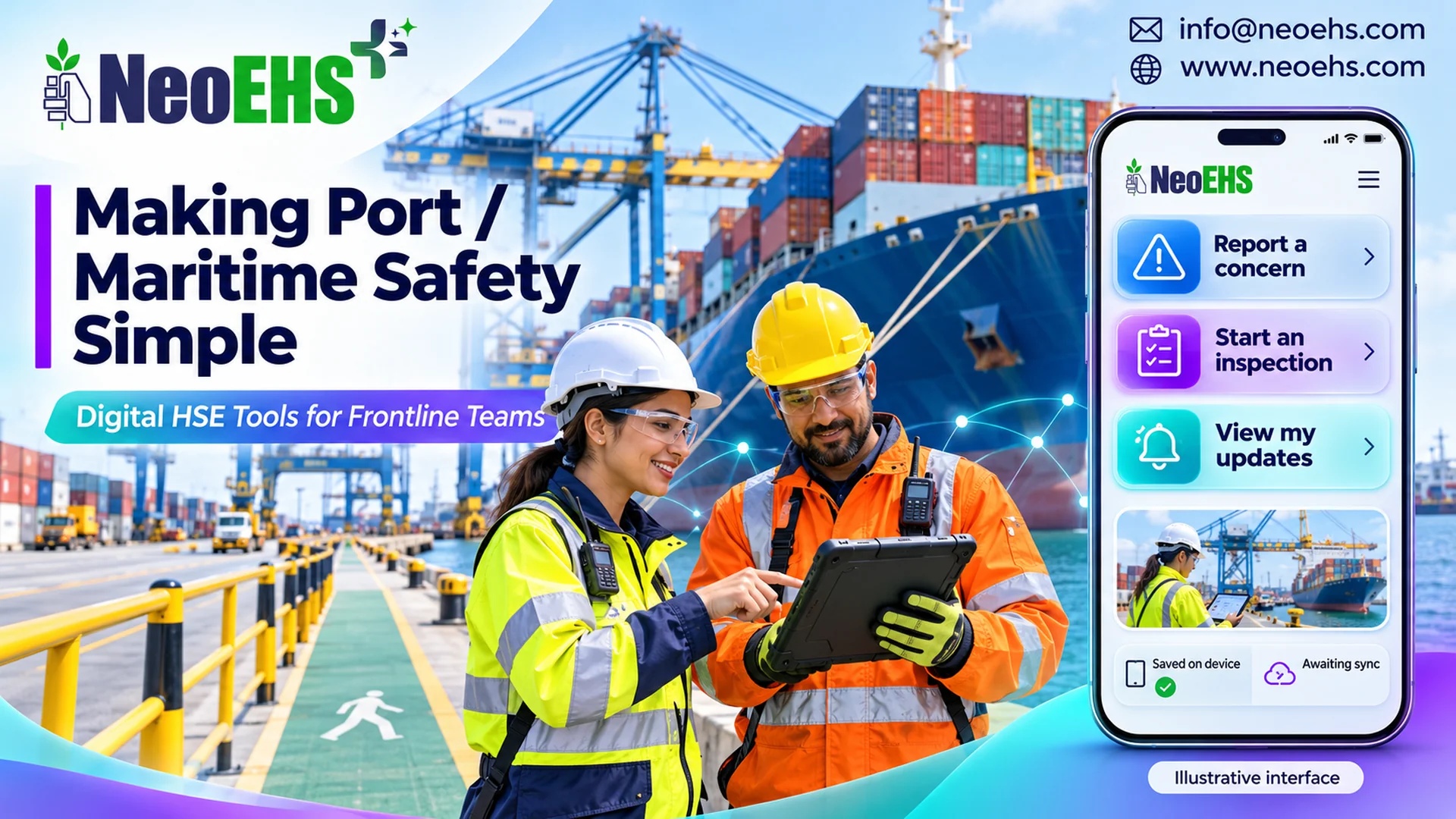
An illustrative home screen might offer “Report a concern,” “Start an inspection” and “View my updates.” Supervisors can have a different view showing assigned reviews, outstanding actions and work requiring attention.
This is a design approach, not a claim that every NeoEHS deployment uses the same interface.
1. Ask for the information needed at that stage
An initial report and a completed investigation serve different purposes.
For an initial concern, useful information may include:
- What was observed.
- The location or asset involved.
- The activity underway.
- Whether urgent attention is needed.
- Any immediate response already taken.
- Supporting evidence, where appropriate and safe to capture.
A reviewer can then confirm classification, investigate causes and determine follow-up through the approved process.
Avoid asking workers to guess a technical category merely to move to the next screen. Provide an appropriate “not sure” route where the workflow allows it.
Required fields should have a clear purpose. Where location or asset information is prefilled, workers should be able to check and correct it.
2. Use words people recognise
“Describe what you noticed” is easier to interpret than “Enter the nonconformity narrative.”
“Saved on this device” communicates something different from “Sent to the review team.” Both are clearer than an unexplained green tick.
Use familiar equipment names alongside formal asset identifiers. Keep instructions short, with one clear question at a time.
HSE’s guidance on procedures identifies style, layout and language as important aspects of usability and encourages procedures that are useful to the workforce. Those principles are relevant when moving instructions onto a screen. Read HSE’s procedures guidance. HSE
For multilingual Port / Maritime teams, test wording with representative users. A translated instruction may be grammatically correct while remaining unclear to the people expected to follow it.
Safety-critical wording should receive appropriate review. Automatic translation should not silently replace an approved instruction.
3. Design for the actual device and environment
An interface demonstrated on a large office monitor may behave very differently on a handheld device outdoors.
Check whether workers can:
- Read labels in representative lighting.
- Select controls without repeatedly tapping the wrong item.
- Understand an error and recover without losing their work.
- Distinguish status through text as well as colour.
- Resume a legitimate task after an interruption.
- Use the approved device with the PPE required for that task.
W3C’s guidance on touch-target size provides a useful accessibility reference. Its minimum requirements include exceptions and should not be treated as proof that an interface is suitable for gloved industrial use. Field testing remains necessary. Read the W3C target-size guidance. W3C
Device use must also fit the location. Do not design a process that encourages someone to use a screen while operating equipment, moving through vehicle routes or performing a task requiring their full attention. Equipment suitability and site restrictions still apply.
4. Make offline status unmistakable
Connectivity can vary across a Port / Maritime facility. The interface should explain what has happened to a record when a connection is unavailable.
These states mean different things:
| Status | Meaning for the user |
|---|---|
| Draft | The record is unfinished |
| Saved on device | Information is stored locally |
| Awaiting sync | Transfer has not yet completed |
| Submitted | The system has received the record |
| Acknowledged | A responsible person has reviewed its receipt |
| Action assigned | Responsibility for the next step has been allocated |
These are proposed interface labels; the actual workflow should define them explicitly.
A locally saved record must not appear as if the responsible team has already received it. If a concern requires immediate attention, workers need the established communication and escalation route.
Offline access also raises a different question for permits: is the displayed information current? A cached permit should not be assumed to reflect a later suspension or change. The organisation’s approved process must govern how current authorisation is verified.
5. Use QR codes to find the right record
A QR code can help a worker reach the relevant asset, inspection or permit record without searching through long lists.
The destination should still show enough information to confirm the match: the asset name, identifier and location, for example.
Scanning a code establishes access to a record. It does not establish that the physical equipment is safe or that all required controls have been verified.
NeoEHS Permit to Work software describes mobile workflows and QR-based permit-status access. During evaluation, test what the user sees when a permit changes, expires or cannot be refreshed. NeoEHS
6. Give useful feedback after submission
For a worker, submitting the report is only the beginning.
The next screen should explain what happens next. Subsequent updates should make ownership and progress understandable.
Compare these two messages:
“Record updated.”
“Your report about the pedestrian route at Berth 3 has been reviewed. Operations is arranging the next action. You can view the update here.”
The second message gives the worker context without requiring them to interpret an internal workflow.
Feedback should also allow clarification. The person who raised the concern may know whether the proposed action addresses the original issue.
Worker participation belongs in the design process itself. OSHA’s guidance recommends involving workers in establishing, operating and evaluating safety programmes, including workers employed through contractors and temporary agencies. Read the worker participation guidance. Occupational Safety and Health Administration
7. Let AI assist with effort-intensive tasks
AI can be useful where it reduces repetitive work without hiding uncertainty.
Potential applications include preparing a draft summary, suggesting a category for review or finding similar earlier reports. Where voice capture is available, it may offer another way to enter information.
Each option needs testing in its intended environment.
Background noise can affect transcription. A summary can omit a qualification. A suggested location can be wrong. Workers and reviewers need a straightforward way to check and correct the result.
Keep the original account available where appropriate. Clearly distinguish a worker’s statement from an AI-generated interpretation.
AI should not silently approve a permit, confirm an isolation or turn an incomplete observation into a verified safety finding.
8. Keep simplicity and accountability together
Reducing unnecessary steps should not remove required approvals, evidence or review responsibilities.
A frontline user may need a short reporting form. The supervisor may need a more detailed review. The system can support both without presenting every question to everyone.
Access also deserves attention. Contractors should be able to perform authorised tasks without gaining access to unrelated records. Shared-device arrangements should preserve individual accountability and protect personal information.
Do not describe a reporting channel as anonymous unless its design, configuration and handling practices support that claim.
Practical Port / Maritime use cases
The following examples are illustrative design scenarios, not customer results.
| Situation | Useful design response | What must remain clear |
|---|---|---|
| A worker notices an obstructed pedestrian route | Short concern form with location and optional evidence | Immediate escalation must not wait for form completion |
| An inspector loses connectivity | Local capture with a visible sync queue | Whether the finding has reached the responsible team |
| A contractor checks permit information | QR access to the relevant record | Current status, scope and authorised responsibilities |
| A worker describes a concern by voice | Editable transcript where the feature is available | The worker must be able to correct errors |
| An incoming shift reviews outstanding findings | Concise list showing location, owner and next action | Unresolved conditions and required handover communication |
| Similar reports appear across a terminal | AI-assisted grouping for competent review | Similar wording does not prove a common cause |
How NeoEHS supports the underlying workflows
NeoEHS’s Port / Maritime solution provides the industry context for connecting frontline reporting with operational HSE processes. NeoEHS
Relevant published capabilities include:
- Incident Management: reporting through channels including mobile, web, voice, QR codes and media uploads.
- Inspection Management: configurable checklists, field evidence and offline inspection capture with later synchronisation.
- Permit to Work: mobile permit workflows and QR-based access to permit status. NeoEHS
The exact interface, permissions, language support, device compatibility and offline behaviour should be confirmed for the proposed deployment. The design examples in this article are evaluation criteria, not a statement that every configuration includes every feature.
Test with frontline teams before expanding
Choose a small set of representative tasks. Ask users from different shifts and employers to complete them in a controlled, safe trial.
Useful test scenarios include:
- Report a concern with an unfamiliar category.
- Correct a wrongly selected asset.
- Save a finding without connectivity and confirm its status.
- Recover from an interrupted task.
- Find an update on an earlier report.
- Identify whether displayed permit information is current.
Observe where users hesitate, seek help or misunderstand a status. Test exceptions as carefully as the normal path.
Measure successful completion, critical information errors, records lost during interruptions, sync failures and users’ understanding of what happens next. Faster completion is useful only when the task is completed accurately.
Make the next step clear
A frontline HSE tool earns its place when a worker can understand it during real work, record useful information and see a credible response.
For Port / Maritime organisations, the best starting point is a representative task—not an impressive dashboard.
Bring that task to a NeoEHS demonstration. Include an interruption, a connection failure and a change requiring review. Then assess how clearly the workflow supports the people responsible.
Contact: info@neoehs.com
Website: www.neoehs.com
What are digital HSE tools for Port / Maritime frontline teams?
They are digital interfaces and workflows that help workers report concerns, complete inspections, access relevant safety information and receive updates. Their usefulness depends on clear design and reliable follow-up.
How can safety reporting forms be made simpler?
Separate initial reporting from later investigation. Ask for information needed to understand and route the concern, use familiar wording and avoid requiring workers to guess technical classifications.
Can digital inspections work without an internet connection?
NeoEHS describes offline inspection capture with synchronisation when connectivity returns. Users should be able to distinguish local storage from successful submission. Urgent concerns still require the established communication route.
Does scanning a QR code confirm that work is safe?
No. A QR code can provide access to a record or permit status. Physical conditions, controls and authorisation must still be verified through the approved process.
How can AI help frontline HSE users?
AI may assist with summaries, suggested categories and finding similar records. Outputs need review and correction. AI should not silently replace a worker’s account or an authorised safety decision.
Should every worker see the same dashboard?
No. Views should reflect authorised tasks and information needs. A worker may need assigned inspections and report updates, while a supervisor needs review queues and outstanding actions.
How should a Port / Maritime organisation test HSE software?
Use representative tasks with frontline users from relevant shifts and employers. Include interruptions, incorrect entries and connectivity loss. Assess accuracy, successful completion and understanding of status—not speed alone.
NeoEHS Port / MaritimeIndustry context and demonstration CTANeoEHS Incident ManagementReporting channels and follow-upNeoEHS Inspection ManagementChecklists, evidence and offline captureNeoEHS Permit to WorkMobile workflows and QR access